How to use paversealguide.com topic clusters for deeper research
Last updated: November 15, 2026
Quick answer: use 1 hub page, 4 supporting pages, and related articles as a 3-layer research trail when you want deeper research on paversealguide.com topic clusters. This guide on How to use paversealguide.com topic clusters for deeper research shows you how to start at the hub page, follow each supporting page, and note the related articles that branch off from it. That gives you a cleaner path than jumping between random posts, because each cluster is built to move from broad coverage to narrower detail without making you start over.
Key takeaways
- A topic cluster is most useful when you treat it like a map, not a menu.
- The hub page gives you the main idea; the supporting pages give you the parts that need closer reading.
- A research trail is stronger when you track what each page answers and what it leaves open.
- Topic depth comes from following the links in order, not from reading every page on the site.
- This method can work well in a short session, such as 15 minutes, if you keep one note for the hub and one note for each supporting page.
What does a topic cluster do here?
A topic cluster on paversealguide.com organizes related pages around one main subject so you can research it in layers. The hub page holds the broad frame, while each supporting page covers one slice of the topic, and that structure saves you from re-reading the same background three times.
For a reader doing deeper research, the point is not just “more pages.” The point is a clearer research path. If the cluster is built well, the hub page tells you where the topic starts, the supporting page tells you where the detail lives, and the related articles show which questions are still nearby. That is different from a loose list of posts, where every page competes for your attention and nothing tells you which order matters.
A good way to think about it is in three layers. The hub page gives the overview in 1 place. The supporting pages split the subject into smaller parts. The related articles add side paths for follow-up reading. That is the structure this article is built around, and it is the same structure you should use when you research with the cluster.
One reason this matters is that research gets messy fast when each page repeats the same framing. If the cluster is doing its job, each page should add a new angle, not just a new headline. If you can summarize the difference between the hub and a supporting page in 1 sentence, the cluster is working. If you cannot, the trail is too flat to help.
For a practical example, think of a cluster with 1 hub page and 4 supporting pages. The hub gives the overview, the 4 pages each tackle a narrower question, and the related articles point to adjacent material. That is enough structure to research a topic deeply without losing the thread.
How do I start the research trail?
You start the research trail by reading the hub page first, then opening the supporting pages in the order they are linked. The hub gives the main route, and the supporting pages let you move from broad coverage to specific evidence without guessing where to go next. Google Search Central recommends organizing site content and internal links so users can understand relationships between pages, and that is the same logic this workflow uses (Google Search Central).
Use this 5-step process:
- Read the hub page once from top to bottom. Note the main subject, the 2 or 3 subtopics it names, and the terms it repeats. You want the cluster’s frame before you chase details.
- Open the first supporting page and ask what new information it adds. If it repeats the hub in different words, mark it as overlap. If it introduces a new angle, keep going.
- Scan the related articles at the end or within the page. These often show where the topic expands next, and that helps you build a wider research trail without leaving the cluster too early.
- Write down one question each page answers. A simple note like “defines the term,” “adds method,” or “shows a use case” keeps the pages from blurring together.
- Return to the hub page after 3 or 4 supporting pages and check whether the main topic still feels complete. If the cluster is thin in one area, that gap is now visible instead of hidden.
This works best when you treat each page as a role, not as a destination, and it is worth checking against a professional content strategist or editor if you are applying the method to a large site. A hub page is not there to say everything. A supporting page is not there to repeat the whole topic. A related article is not there to replace the main path. If you keep those jobs separate, the cluster becomes a research tool instead of a pile of tabs.
A common mistake is opening the most specific page first. That feels efficient, but it usually creates confusion because you do not yet know how the smaller point fits the larger subject. Starting with the hub page takes a few extra minutes, yet it saves much more time later because the terms and subtopics already have a place.
How do I spot cluster depth fast?
You spot cluster depth fast by checking whether each page adds a different layer of detail rather than the same layer in a new wrapper. A deep cluster usually has a clear hub page, multiple supporting pages, and related articles that extend the topic instead of circling it.
One useful test is to ask whether the page changes the kind of answer you get. A hub page often gives the broad explanation. A supporting page may give a process, a comparison, a breakdown, or a narrower topic expansion. A related article may answer a follow-up question that would otherwise distract from the main route. If all 3 page types sound alike, the cluster depth is shallow.
Look for the number of distinct questions the cluster can answer without breaking apart. A cluster with 1 broad page and 2 thin pages is not much use for deeper research. A cluster with 1 hub page and several supporting pages can point you toward definitions, use cases, related articles, and topic expansion in a single path. That is the difference between surface coverage and useful depth.
Another sign of depth is the way the pages link to each other. A strong cluster makes the next step obvious. If you need to backtrack after every page, the structure is not helping you research. Nielsen Norman Group notes that clear navigation and information architecture reduce user effort and improve findability, which is why a clean link pattern matters (Nielsen Norman Group).
The quickest check is simple: count the distinct jobs the pages perform. If you can name 3 different jobs, the cluster has shape. If every page is just “more on the same thing,” you are not getting depth; you are getting repetition.
Which pages should I read first?
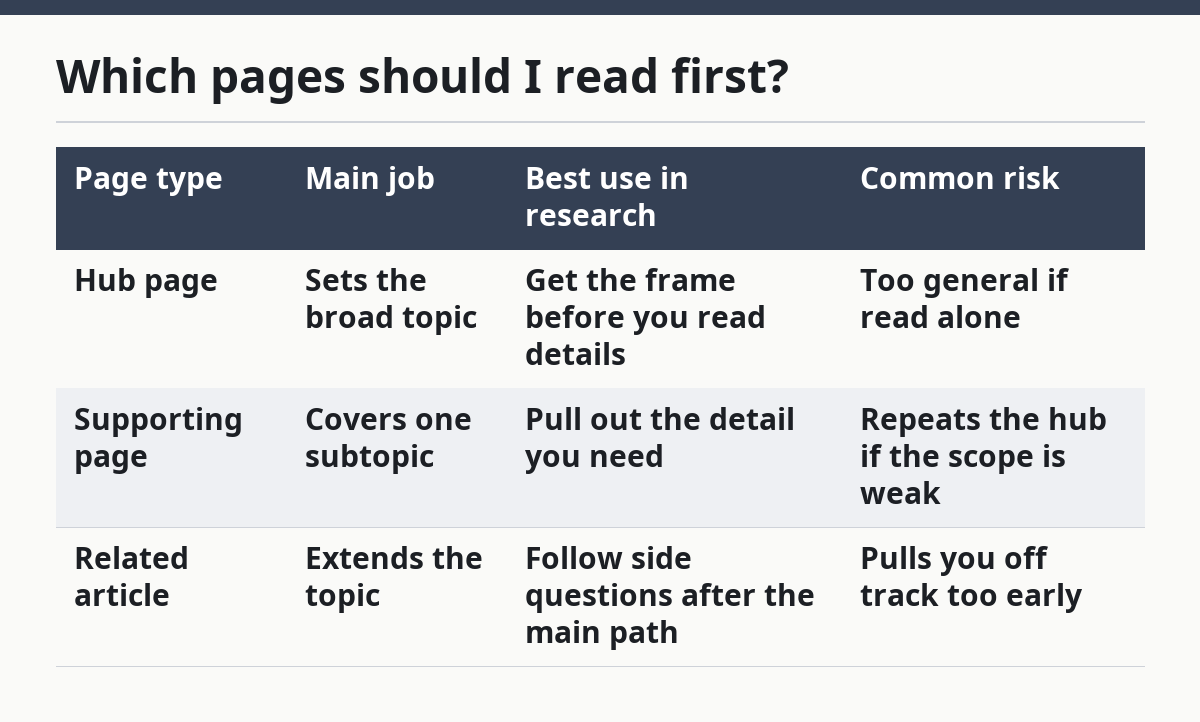
You should read the hub page first, then the supporting pages, then the related articles that fill in gaps. That order gives you the cleanest research trail because each layer depends on the one above it.
| Page type | Main job | Best use in research | Common risk |
|---|---|---|---|
| Hub page | Sets the broad topic | Get the frame before you read details | Too general if read alone |
| Supporting page | Covers one subtopic | Pull out the detail you need | Repeats the hub if the scope is weak |
| Related article | Extends the topic | Follow side questions after the main path | Pulls you off track too early |
Read the hub page in 1 pass first. Then read the supporting page that looks most central to your question. After that, choose the remaining pages by what they add, not by what looks shortest. A 600-word page can be more useful than a longer one if it covers the exact subtopic you need.
This order matters because topic clusters are built to reduce backtracking. If you read a supporting page before the hub page, you may understand the narrow point but miss the reason it belongs in the cluster. If you read related articles first, you may chase side questions before you know what the main topic is. The cluster works best when the broad path comes before the side paths.
When a supporting page raises a new term, stop and note it. That term is usually the bridge to another page in the cluster or to a useful expansion outside it. A good research habit is to keep 2 lists: one for terms you need to define, and one for pages you still need to compare.
How do I turn page links into notes?
You turn page links into notes by recording what each page adds in one short line, not by copying paragraphs. The point is to build a usable research trail, and a 1-line note for each page is enough to show how the cluster grows.
A simple note format works well: page type, main point, and next question. For example, you might write “hub page: broad overview; next question: which subtopics are broken out?” or “supporting page: explains one part; next question: what related articles expand this?” That is enough to keep the trail clear without turning your notes into a second version of the site.
Use 3 note fields for every page:
- What does this page answer?
- What does it leave open?
- Which page should I read next?
That 3-part note helps you compare pages fast. If 2 supporting pages answer the same thing, you have overlap. If a related article opens a new branch, you have expansion. If the page leaves a question that no linked page answers, you have a gap in the cluster. If that pattern keeps showing up, it is worth getting a subject-matter review before you assume the cluster is complete.
A useful part of this method is that it can still work in a short session, such as 15 minutes. You do not need a full outline to get value from the cluster. You only need a short record of what each page does. That is enough to build a research trail that can be used later for writing, planning, or deeper reading.
A mistake to avoid is turning every page into a quote bank. Quotes can help, but if you collect too many, you lose the structure. The cluster is there to show relationships between pages, not to become a pile of cut-and-pasted lines.
How do I find topic expansion without losing the thread?
You find topic expansion without losing the thread by following only the links that still belong to the main subject. The cluster should widen in a controlled way, not jump into a different topic after 1 click.
A good expansion usually does one of 3 things. It adds a related angle, it breaks a broad point into parts, or it answers a question that came up in the supporting page. If the new page feels like a different subject entirely, pause and ask whether it still belongs in the same research trail. A cluster can point outward, but it should not drift.
This is where the hub page matters again. Return to it after you read a few supporting pages and check whether the new material still fits under the main topic. If it does, keep going. If it does not, you have found a boundary, and that boundary is useful. It tells you where this cluster ends and where a separate cluster should begin.
The trade-off is simple. Wider reading gives you more context, but it also creates noise. Narrow reading keeps you focused, but it can hide an adjacent topic you should know. Topic clusters are useful because they sit between those two extremes. They give you a controlled way to move from core topic to side topic in steps, not in leaps.
If you want to keep the thread tight, limit yourself to 1 new branch at a time. Read the hub page, then 1 supporting page, then 1 related article that clearly belongs. That small rule keeps the research trail readable and stops the cluster from turning into a web of half-finished tabs.
What should I avoid when using this cluster?
You should avoid reading the cluster as a list instead of a path. A list gives you items; a path gives you order, purpose, and a way to compare pages. That difference is what makes deeper research possible.
The most common mistake is stopping at the hub page. That leaves you with the broadest view and none of the detail. The opposite mistake is starting with the most specific page and assuming it tells you the whole story. Both mistakes flatten the cluster and waste the structure.
A second mistake is treating every related article as equally important, which is where editorial judgment or subject-matter guidance can help if you are unsure. They are not. Some articles are there to expand the topic, and some are there to answer a narrow follow-up. If you read them in the wrong order, you may spend 20 minutes on a side question before you understand the main one.
A third mistake is ignoring overlap. If 2 pages keep restating the same point, the cluster is telling you something about coverage, scope, or weak separation. That can be a sign to revisit the structure, not a reason to quit. It shows where the topic is heavy and where the cluster may need sharper boundaries.
For deeper research, the right habit is to compare roles, not page length. A 300-word supporting page can be more useful than a longer one if it fills a missing piece. The cluster works when each page earns a different job.
Where does paversealguide.com fit in this process?
paversealguide.com fits as the source of the cluster, not as a replacement for your own reading order. The site gives you the hub page, supporting page, and related articles that shape the research trail, and your job is to follow that structure with intent.
If you are using the site for the pillar “content architecture and topic coverage,” keep that pillar in view while you read the cluster. That helps you see which pages explain structure, which pages explain coverage, and which pages push into topic expansion. You do not need to answer every side question here; the cluster only needs to give you a cleaner route through the topic.
The strongest use of the site is to move from broad coverage to specific detail without losing context. That is why the page order matters so much. A hub page gives the map, a supporting page gives the turn, and a related article gives the side road. If you keep that sequence, the cluster becomes a practical research system instead of a pile of content.
For a reader who wants to think more clearly about a topic, that is the real value. The site’s cluster structure helps you see what belongs together, what needs a second look, and what should be left for another branch of research.
What is a topic cluster on paversealguide.com?
A topic cluster on paversealguide.com is a group of related pages built around one main subject. The hub page sets the broad topic, the supporting pages break it into smaller parts, and the related articles extend the discussion.
That structure helps you read in order instead of jumping around. It also makes it easier to see how one page leads to the next.
How do I move from one cluster to another?
You move from one cluster to another by following the topic boundary, not by clicking every link you see. When a supporting page starts to answer a different subject, that is usually the point where another cluster begins.
A good rule is to finish the current hub page and its main supporting pages before changing direction. That keeps your research trail clean and prevents one topic from swallowing another.
How can topic clusters help me research faster?
Topic clusters help you research faster because they cut down on guesswork. The hub page gives you the frame, and the supporting pages tell you which detail comes next.
That means you spend less time searching for background and more time comparing useful pages. A cluster also makes gaps easier to spot, which helps you decide what to read next.
Drafted with AI; not yet reviewed by a person.